
- Home
- For therapists
For therapists, counsellors and psychiatristsA mood diary your client keeps, and brings to session.
Moodflow is a free mood diary for iPhone, Apple Watch and Android. Between sessions, your client rates their mood on a five-point scale and can add emotions, sleep, symptoms, medications and notes. Before you meet, they can export a free clinical summary PDF. Entries stay on their phone, nobody monitors them, and there is no clinician portal.
Moodflow at a glance
The short version for a colleague who asks.
- Cost to your client
- Free to download. Mood check-ins, journals, reminders and the clinical summary PDF are free. Moodflow Plus is an optional subscription.
- Platforms
- iPhone, Apple Watch (with the iPhone app) and Android.
- Languages
- English, German, Spanish, French, Italian, Japanese and Brazilian Portuguese.
- Where entries live
- On your client’s phone. No account is needed. Backups are optional: a file on the phone or a hidden app folder in their own Google Drive.
- Clinician access
- None. There is no portal or dashboard. You see what your client chooses to show or send.
- Ads and tracking
- No ads and no usage analytics in the app. Crash reports carry technical details, not diary content.
- Measures
- A five-point mood rating and optional symptom severity. No PHQ-9, GAD-7 or other validated questionnaires.
- Crisis handling
- No risk detection or alerts. Nobody reads entries, and Moodflow is not an emergency service.
- AI
- Flowy is optional, part of Moodflow Plus, and off until your client agrees to share a summary with Anthropic.
- Status
- A self-monitoring app. Not a medical device, not a treatment, not a prescribable DiGA, and not tested in a clinical trial.
What does my client record, and how long does it take?
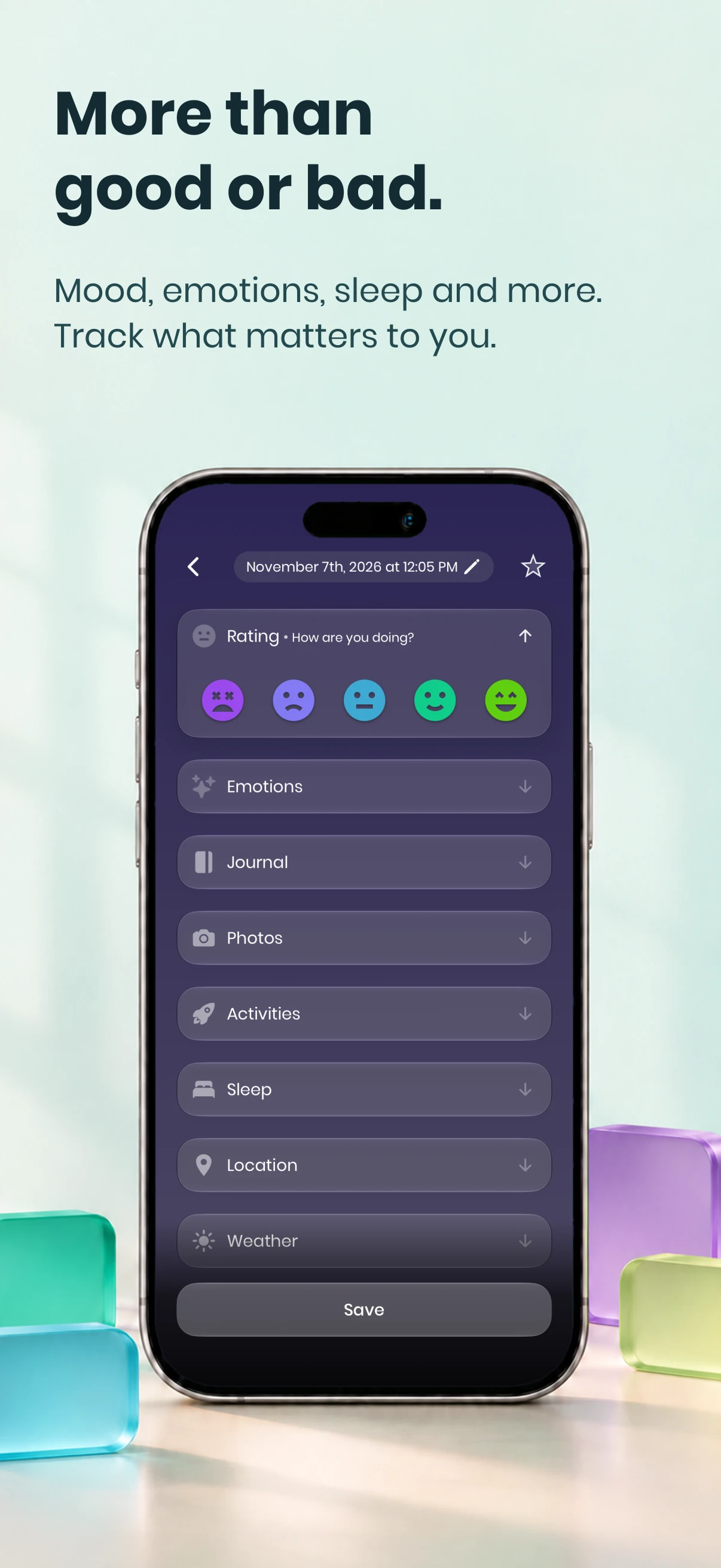
A basic check-in is one tap on a five-point mood scale, from the app, a widget or an Apple Watch. Everything else is optional and can be hidden: emotions, activities, people, sleep and restedness, symptoms with severity, medications with dose, energy, stress and focus, and a note. Reminders can be set for fixed times of day.
- Mood from 1 to 5, as often as they like. Several check-ins on one day are averaged for that day.
- Context they choose to tag: emotions, activities, people and places.
- Body: sleep and restedness, symptoms with severity, medications with dose, and energy, stress and focus.
- If they connect it, sleep, steps, exercise, resting heart rate and HRV from Apple Health or Health Connect, read on the phone.
- Words: a short note on any check-in, plus daily, gratitude and symptom journals.
For between-session work, fewer fields work better. Agree on the mood rating plus one or two things that matter for your work together, and switch the rest off in the app’s check-in settings.
What arrives in the session?
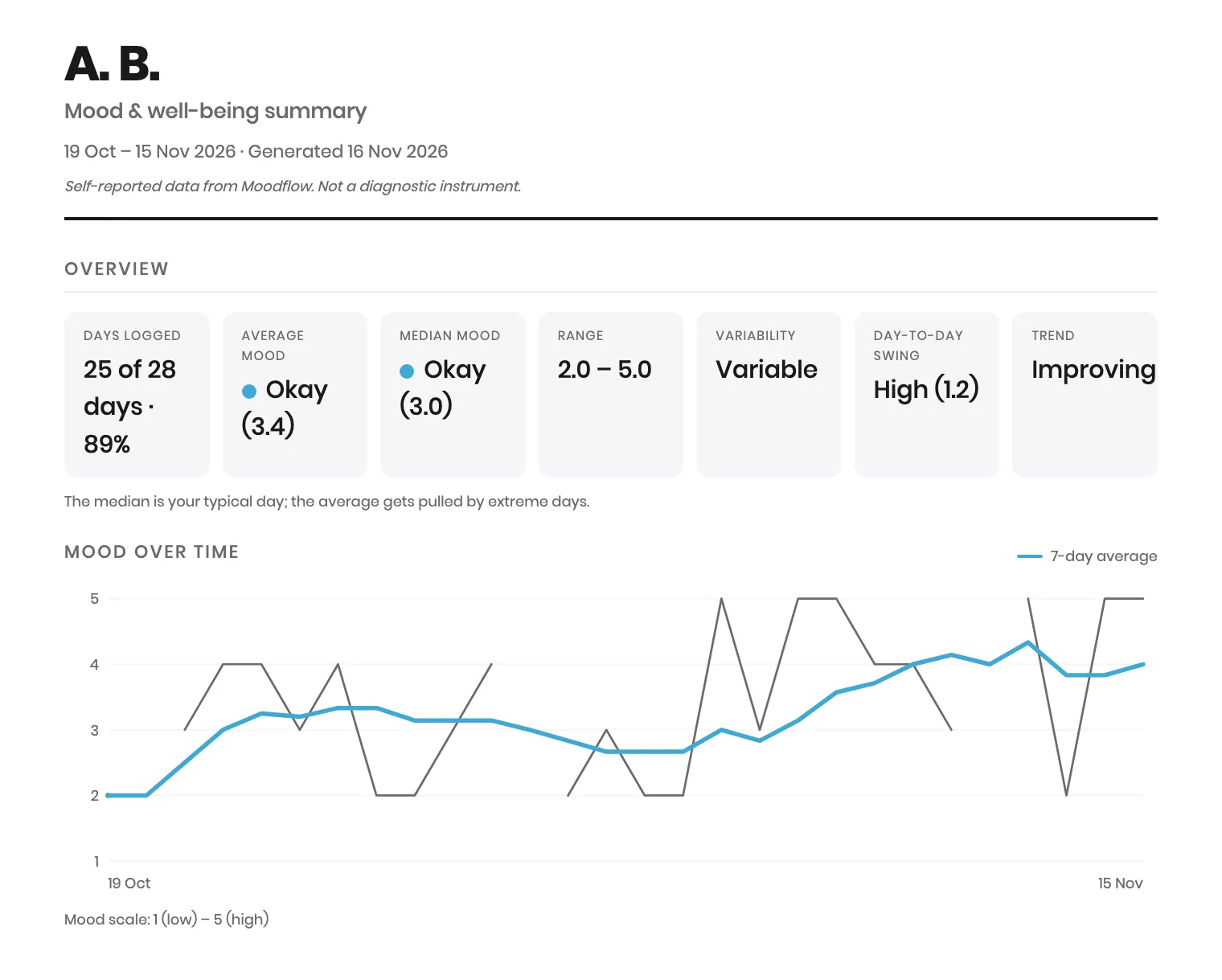
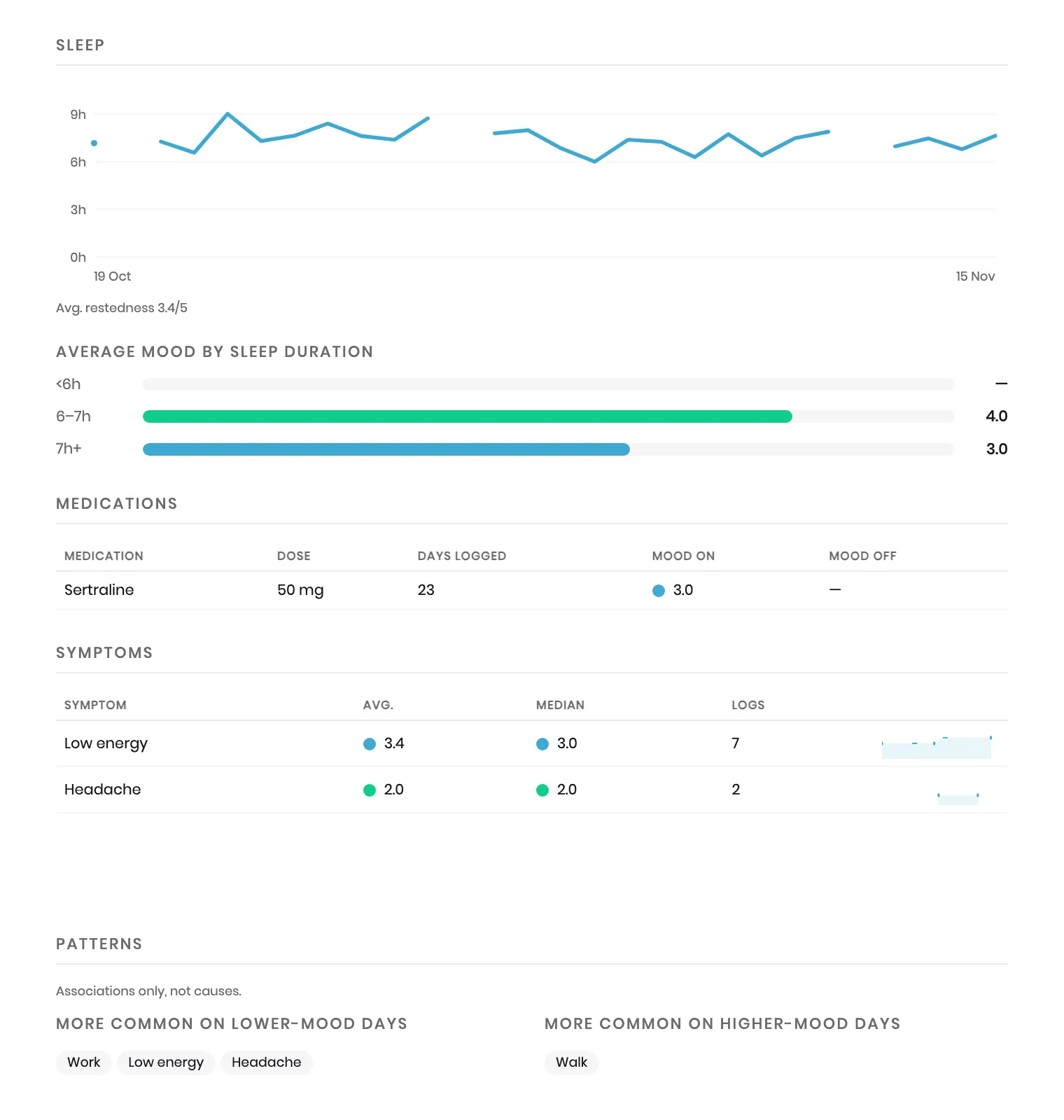
A clinical summary PDF that your client creates in Settings › Privacy & data › Export as PDF › Clinical summary. It is free for any date range. It shows days logged, average and median mood, range, variability, trend, a mood chart and calendar, and, if included, sleep, medications, symptoms and patterns. Journal notes and full entries are left out unless your client adds them.
- Overview: days logged out of the period, average and median mood, range, variability, day-to-day swing and trend.
- Mood over time with a seven-day average, a mood calendar, and low-mood stretches of two or more days at 2 or below.
- The emotions chosen most often, mood by time of day and by weekday, and mood against movement.
- Sleep, medications (mood on days taken and not taken), symptoms and patterns, each labelled as associations, not causes.
- A name or initials field, and a line on the first page: self-reported data, not a diagnostic instrument.
How the PDF reaches you is for the two of you to agree: printed, shown on the phone, or sent through a channel your practice already uses for client documents. Once you have it, it is part of your records and your usual confidentiality rules apply.
Who holds the data, and where does it go?
Your client does. Moodflow keeps the diary on their phone and works without an account. Nothing reaches you unless they export or show it. A few optional features send specific data elsewhere: backups to their own Google Drive, Plus photo backups to cloud storage, location and weather lookups, and Flowy summaries to Anthropic after consent.
- App Lock opens Moodflow with Face ID, Touch ID, a fingerprint or the phone’s passcode.
- Backups are a file saved on the phone, or a daily copy in a hidden app folder of the client’s own Google Drive. That copy is a readable file, not separately encrypted by Moodflow.
- No ads, no advertising ID and no sale of personal data.
- Your client can delete the journal from the phone and delete their account in Settings.
Moodflow is not a HIPAA covered entity and does not sign business associate agreements. It is a consumer app your client chooses and controls. Under HHS guidance, an app a patient picks for their own use is generally not acting on the provider’s behalf. The privacy policy explains GDPR rights; Moodflow holds no privacy certification.1
Read the privacy policyWhat does it cost my client?
Nothing, for what between-session monitoring needs. Mood check-ins, journals, the calendar, reminders and the clinical summary PDF are free, and the PDF has no date limit. Moodflow Plus is an optional subscription for correlations, timeframe comparisons, routines, photo backup and Flowy. Prices vary by country and are shown in the app store.
The free version has no ads. It does show occasional invitations to try Plus, which your client can ignore.
What does the evidence support, and where does it stop?
Self-monitoring is a standard part of CBT, and measurement-based care helps most when the data is reviewed with the client in session. Mood monitoring on its own has not shown a clear effect on symptoms in randomized trials. Moodflow has not been tested in a clinical trial, so treat it as a recording tool, not a treatment.
What the research supports
- Self-monitoring gives client and therapist shared data to test ideas against, a core of collaborative empiricism in CBT.2
- Completing between-session homework is associated with better CBT outcomes.3
- Measurement-based care works through review: frequent feedback in the session helped, while feedback given outside it did not.4,5
- Progress feedback has a small average benefit: d = 0.15 on symptoms across 58 studies.6
Where it stops
- A 2026 meta-analysis of eight randomized trials with 1,230 participants found mood monitoring did not clearly increase or decrease symptoms in bipolar disorder or depression.7
- Burden or worsening mood affected a small number of users, but most studies did not measure adverse events, so the true rate is uncertain.8
- Most people stop using mental-health apps within weeks. In one panel study, median 15-day retention was 3.9%.9
- A five-point mood rating is not a validated measure. Use the PHQ-9, GAD-7 or your usual instruments when you need a score.10
What Moodflow does not do
- No clinician dashboard, remote monitoring or alerts.
- No risk detection. Nobody reads entries between sessions.
- No validated questionnaires or scoring.
- No business associate agreement and no link to your records system.
- No practice accounts, licences or referral codes.
Who it may not suit
- Clients at acute risk, who need a safety plan and people, not an app.
- Clients for whom recording turns into checking, rumination or self-criticism. You will know when that applies.
- Clients without a smartphone, or who prefer paper. A free printable mood diary does the same job.
- Settings that require a business associate agreement or data inside your own system.
How do I introduce it to a client?
Agree on the purpose first, then keep it small: one rating a day at a set time, one or two extra fields, and a plan for what to bring. Give your client the printable handout or read the script below, then look at the summary together at the next session.
- Name the question. “Do evenings after work pull your mood down?” is easier to track than “monitor your mood”.
- Choose the fields together: the mood rating plus one or two, such as sleep or one symptom. Switch the rest off.
- Set one reminder at a time your client is usually free.
- Agree what to bring: the clinical summary for the weeks since you last met, or two or three entries they want to talk about.
- Agree when to stop. If tracking feels like a chore, makes things worse or turns into checking, they pause and tell you.
Between now and our next session, I’d like you to try a short mood check-in once a day. Moodflow is one free option. Your entries stay on your phone, and nobody, including me, sees them unless you choose to show me. Rate your mood from 1 to 5 around [time], and add [sleep / one symptom] if you can. Missed days are fine. Before we meet, open Settings, then Privacy & data, then Export as PDF, and choose Clinical summary. Bring it or show it on your phone. If tracking starts to make things harder, stop and tell me. If you are ever in crisis, don’t write it in the app: call [local crisis number].
Printable client handout
One page to fill in together: why you are tracking, when to check in, what to record, how to export the summary, and what to do in a crisis.
Download the handout (PDF)Questions clinicians ask
Is Moodflow HIPAA compliant?
Moodflow is not a HIPAA covered entity and does not sign business associate agreements. It is a consumer app your client chooses and controls, and entries stay on their phone. Under HHS guidance, an app a patient picks for their own use is generally not acting on the provider’s behalf. Anything the client shares with you falls under your usual record-keeping rules.
Can I see my client’s entries between sessions?
No. Moodflow has no clinician portal, sharing link or live sync. Your client decides what you see: they can export a clinical summary PDF, show the app in session, or share selected entries. This keeps control with the client, and it also means nobody is watching for warning signs.
Does it cost my client anything?
No. Mood check-ins, journals, reminders and the clinical summary PDF are free, and the PDF works for any date range. Moodflow Plus is an optional subscription for extra insights, routines, photo backup and the AI companion Flowy. Nothing described on this page for between-session monitoring requires Plus.
Is Moodflow evidence-based?
Moodflow supports a practice with evidence behind it, self-monitoring that is reviewed with a clinician, but the app itself has not been tested in a clinical trial. Randomized trials of mood monitoring alone have not shown a clear effect on symptoms. Use it as a recording tool within your treatment plan, not as a treatment.
Could daily mood tracking make a client worse?
It can for some people. A 2025 review found burden or worsening mood in a small number of mood-monitoring users, with adverse events rarely measured. Keep check-ins short, agree a stopping rule, and ask about the experience of tracking at each review, not only the numbers.
What happens if my client is in crisis?
Moodflow does not detect risk, send alerts or contact anyone, and nobody reads entries. Make sure your client has a crisis plan with local emergency and helpline numbers that does not depend on the app, and tell them not to use a diary entry to ask for help.
Does the AI companion send my client’s data anywhere?
Only if your client turns it on. Flowy is optional and part of Moodflow Plus. After consent, a summary goes to Anthropic: mood ratings, the names of emotions, activities and symptoms, self-logged sleep, energy, stress and focus, and the questions asked. In chat, their first name and recent moods are sent too. Journal text, notes, photos, names of people and places, medications, the cycle log and Apple Health or Health Connect data stay on the phone.
Does Moodflow use validated measures like the PHQ-9?
No. Moodflow uses a five-point mood rating and optional symptom severity on scales the client sets up. They help you see change and context, but they are not validated scores and cannot be converted into one. Give the PHQ-9, GAD-7 or other measures as you normally would.
Is there a version for practices, or a discount for clients?
Not at the moment. There are no practice accounts, bulk licences or referral codes. Everything a client needs for between-session monitoring is in the free version.
Further reading
How to choose a mood-tracking app to recommend to clients
Evaluation criteria, setting up between-session monitoring, reviewing data in session, and pitfalls. Useful whichever app you choose.
What to track before therapy
Our guide for clients: what to write down before a first appointment and what to bring.
Daily mood journal template and free PDF
A printable fourteen-day mood diary for clients who prefer paper.
Privacy policy
Exactly what Moodflow stores, where, and what optional features send.
Sources
- US HHS Office for Civil Rights: Health app use scenarios and HIPAA (2016)
- Cohen et al.: Using self-monitoring: implementation of collaborative empiricism in cognitive-behavioral therapy (2013)
- Kazantzis et al.: Quantity and quality of homework compliance: a meta-analysis of relations with outcome in cognitive behavior therapy (2016)
- Fortney et al.: A tipping point for measurement-based care (2017)
- Lewis et al.: Implementing measurement-based care in behavioral health: a review (2019)
- de Jong et al.: Using progress feedback to improve outcomes: multilevel meta-analysis (2021)
- Astill Wright et al.: Mood monitoring, mood tracking, and ambulatory assessment interventions in depression and bipolar disorder: meta-analysis of randomized controlled trials (2026)
- Astill Wright et al.: Adverse events of mood monitoring and ambulatory assessment in depression and bipolar disorder: systematic review and meta-analysis (2025)
- Baumel et al.: Objective user engagement with mental health apps: systematic search and panel-based usage analysis (2019)
- Kroenke et al.: The PHQ-9: validity of a brief depression severity measure (2001)